
In a heterogeneous corporate network, during the migration of Domain Controllers from Windows Server 2016 to Windows Server 2025, NAS solutions that were configured to set file system access based on Active Directory objects stopped working.
This manifested itself in such a way that when setting permissions for a given share or folder, only the SID appeared instead of the Active Directory security groups. At the same time, it was not possible to add new Active Directory objects to the ACL.
The reason was that the default security configuration of new Windows Server 2025 enforces the use of Secure LDAP. However, the NAS solutions were using unencrypted LDAP. After adding new Domain Controllers to Active Directory, this issue started occurring intermittently, depending on which Domain Controller responded to the NAS devices’ requests.
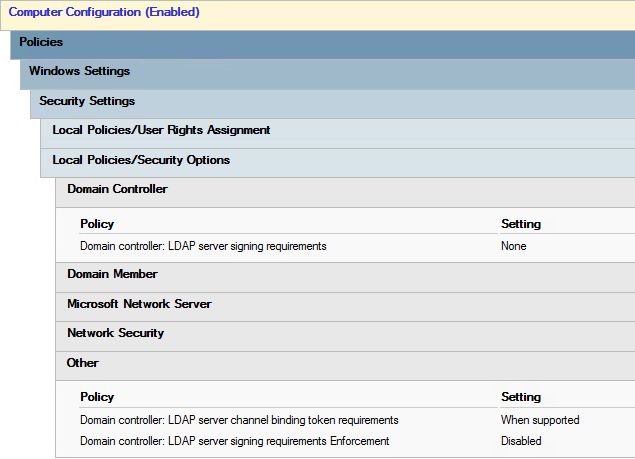
The solution was to disable encrypted LDAP via Group Policy. Specifically, it was sufficient to create a Group Policy for the new Domain Controllers with the following settings configured:
| GPO settings | Unencrypted LDAP | Encrypted LDAP |
| Domain controller: LDAP server signing requirements | None | Require signing |
| Domain controller: LDAP server channel binding token requirements | When supported | Always |
| Domain controller: LDAP server signing requirements Enforcement | Disabled | Enabled |
That’s all
Leave a Reply